Flowchart By Code Converter – Visual Programming Logic Easily
What is a Flowchart to code Converter?
A code-to-flowchart converter is an advanced software solution that automatically transforms programming code into visual diagrams. It helps developers, students, software engineers, and technical writers understand complex logic structures in a more organized and graphical way. Instead of manually drawing diagrams, users can instantly generate accurate visual representations directly from source code.
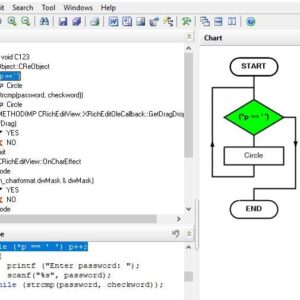
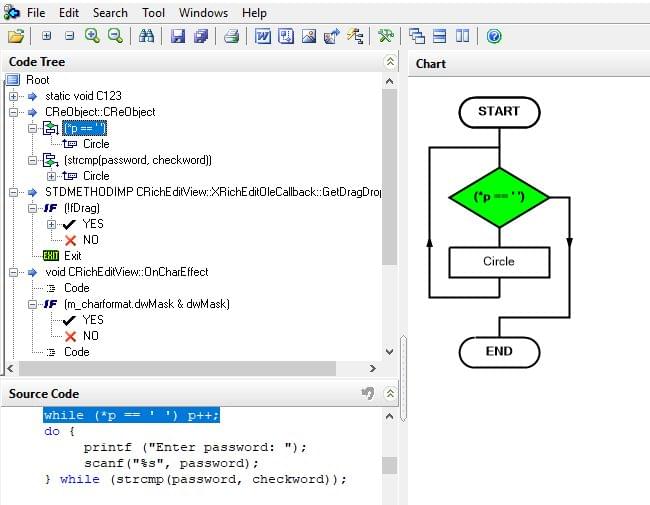
This intelligent tool contains two synchronized sections: a code editor and a dynamic flowchart window. When users edit the source code, the diagram updates automatically in real time. Likewise, modifications in the flowchart can reflect corresponding structural changes in the code representation.
The software is highly beneficial for debugging, algorithm planning, project documentation, software development, and programming education. By converting code into easy-to-understand diagrams, teams can improve collaboration and reduce development errors.
Key Features of the Converter
1. Automatic Diagram Generation
The core functionality of this converter is its ability to automatically generate professional flowcharts from programming logic. This feature reduces manual effort and saves valuable development time.
2. Real-Time Synchronization
The code editor and visual diagram window remain synchronized continuously. Any updates made to the code instantly appear in the generated chart.
3. Multi-Language Support
This powerful tool supports several programming languages, including:
- C
- C++
- VC++
- PHP
- Pascal
- Delphi
Future updates are expected to support additional modern programming languages and scripting frameworks.
4. Easy Documentation Creation
Developers can create professional technical documentation for software projects using automatically generated visual diagrams. These charts improve communication among developers, testers, and project managers.
5. Beginner-Friendly Interface
The simple interface allows beginners to learn programming structures more effectively. Students can understand loops, conditions, functions, and algorithms visually.
Why Developers Prefer Visual Programming Diagrams
Modern software applications often contain thousands of lines of code. Reading large codebases manually can be time-consuming and confusing. Visual diagrams simplify complex program structures into organized workflows that are easier to analyze.
Software companies commonly use these tools during:
- Application development
- System architecture planning
- Bug fixing and debugging
- Training and education
- Project documentation
- Workflow optimization
Visual programming charts help developers identify logical errors quickly while improving productivity.
Support for C, C++, VC++, and PHP
This converter is especially useful for traditional programming languages like C, C++, and VC++, where complex conditions and nested loops are common. PHP developers also benefit from visual diagrams when building dynamic web applications and backend systems.
Example Programming Workflow
Start
   ↓
Input Source Code
   ↓
Analyze Program Logic
   ↓
Generate Visual Diagram
   ↓
Edit & Optimize Structure
   ↓
Export Documentation
   ↓
End
This structured workflow makes the software development process more efficient and organized.
Major Benefits for Developers
Improved Code Understanding
Visual representation makes programming logic easier to understand, especially for large projects and enterprise applications.
Faster Debugging
Developers can quickly identify incorrect conditions, loops, and execution paths without manually tracing the entire source code.
Better Team Collaboration
Charts improve communication between development teams and non-technical stakeholders.
Reduced Documentation Time
Automatically generated diagrams significantly reduce the need for manual documentation work.
Educational Advantages
Students and beginner programmers can learn algorithms and coding structures in a more interactive and visual format.
Best Practices for Better Results
To get the best results from this software:
- Write clean and structured code.
- Use meaningful variable names.
- Organize functions logically.
- Regularly update project documentation.
- Export diagrams for presentations and reports.
Create Visual Diagrams from Source Code
The converter can generate visual diagrams from abstract code, presenting a program in a more straightforward way. The system mainly consists of two synchronized components: a code editor and a visual flowchart window. It is widely used for software development, algorithm analysis, and technical document writing.
The platform supports multiple programming languages, including C, C++, VC++, PHP, and Pascal/Delphi, with additional language support expected in future updates.