ColFolder – Change Color & Icon of Folder Easily
Managing files becomes much easier when folders are visually organized. ColFolder is a lightweight and user-friendly software tool designed to help users customize folder icons and colors in just a few clicks. Instead of using the default yellow folder appearance, users can personalize folders according to categories, projects, or priorities. This makes navigation faster and improves desktop organization for both personal and professional use.
Unlike complicated customization software, ColFolder focuses on simplicity and efficiency. The application works smoothly on Windows systems and allows instant visual changes without affecting folder data. Whether you want to organize office documents, gaming files, media collections, or educational materials, this software provides a practical solution.
Folder color Customization Features
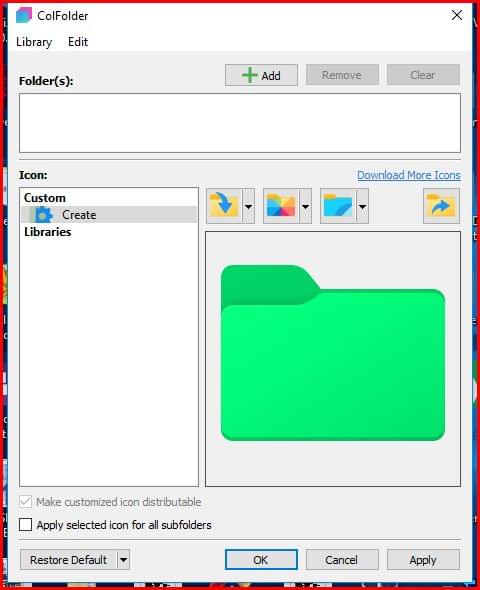
One of the strongest advantages of ColFolder is its ability to instantly modify folder appearances without technical knowledge. Users can right-click on a folder, select a preferred color or icon, and apply the changes immediately. This process saves time and enhances productivity when handling multiple directories.
Key Features of ColFolder
- Change folder colors instantly
- Apply custom folder icons
- Lightweight freeware application
- Easy right-click integration
- Simple and beginner-friendly interface
- Fast installation process
- Supports quick visual categorization
- Improves desktop organization
The software is especially useful for professionals who manage multiple projects daily. By assigning unique visual styles to folders, users can identify important directories much faster than reading file names individually.
Why Use Folder color Management Software?
Traditional folder structures can become confusing when dealing with hundreds of files. Visual customization offers a cleaner and more organized workflow. With ColFolder change color & Icon of Folder, users can create color-coded systems for work, entertainment, education, or backups.
For example:
- Red folders for urgent tasks
- Blue folders for work documents
- Green folders for financial records
- Yellow folders for media collections
This visual separation reduces clutter and improves accessibility. Students, office workers, and content creators can all benefit from a more organized desktop environment.
Additionally, folder customization improves workflow efficiency because users spend less time searching for directories. This can increase productivity during multitasking or project management.
Folder color Integration and Performance
Another major advantage of ColFolder is its lightweight performance. The application does not consume heavy system resources, making it ideal even for older computers. Installation is quick, and the software integrates directly into the Windows context menu for faster access.
Unlike many advanced customization utilities, ColFolder change color & Icon of Folder avoids unnecessary complexity. Users do not need advanced technical skills to personalize folders. The clean interface ensures that even beginners can start customizing folders immediately after installation.
If you want to learn more about Windows customization tools, visit
Microsoft Windows Support
You can also explore icon design resources at
Flaticon Official Website
Benefits of Using ColFolder change color & Icon of Folder
Using visual folder organization provides several long-term advantages:
- Faster file identification
- Better workspace organization
- Reduced desktop clutter
- Improved productivity
- Personalized user experience
The software is particularly beneficial for users working with large volumes of data daily. Instead of relying only on folder names, color-coded systems create a more intuitive navigation experience.
For additional productivity tools, check our internal resources:
- Best Windows Customization Tools
- How to Organize Desktop Files Efficiently
- Top Free Utility Software for Windows
Final Thoughts on Folder color Tools
ColFolder delivers a simple yet effective solution for users who want better folder organization without paying for premium software. Its quick installation, lightweight performance, and easy customization options make it an excellent utility for everyday use. Whether you are organizing work projects, personal files, or study materials, this software adds both visual appeal and practical functionality to your desktop environment.
As a freeware tool, ColFolder provides excellent value for users seeking a reliable and efficient folder customization experience.