WiFi Password Descriptor
What is WiFi Password Decryptor?
WiFi Password Decryptor is a reliable and easy-to-use software program designed to help users recover forgotten WiFi passwords stored on their own computers or laptops. Many users connect to wireless networks once and later forget the password because the device automatically remembers it. This tool allows users to retrieve previously saved passwords quickly without needing advanced technical knowledge.
Unlike hacking tools or illegal password cracking software, WiFi Password Decryptor works only with networks that have already been connected to the user’s device. It does not hack external WiFi networks or bypass wireless security systems. The software simply displays passwords already stored in the Windows operating system.
This makes it an ideal solution for home users, IT administrators, office staff, and network professionals who need quick access to saved wireless credentials. Whether you are resetting a router, connecting a new device, or troubleshooting network issues, the software helps save time and avoid frustration.
Key Features of WiFi Password Decryptor
1. Recover Saved WiFi Passwords Instantly
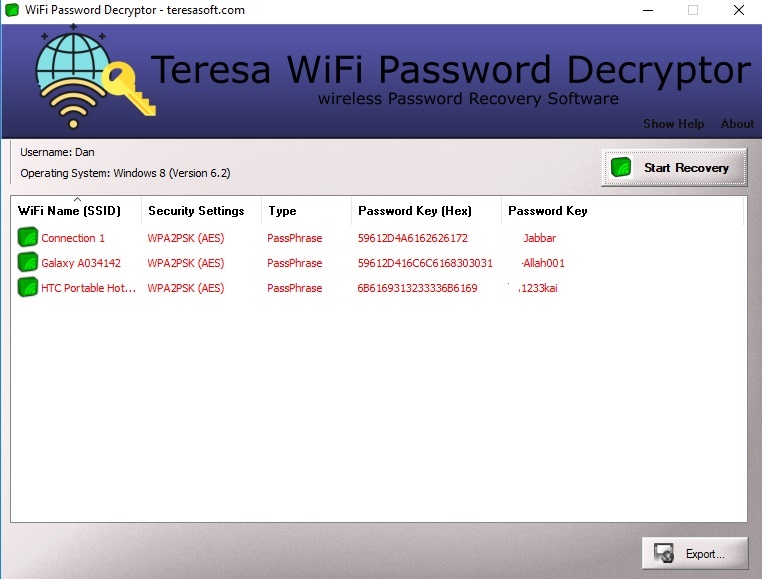
The main feature of WiFi Password Decryptor is its ability to recover stored wireless passwords instantly. Once the software scans the system, it displays all saved WiFi profiles along with their security details and passwords.
2. User-Friendly Interface
The software comes with a clean and simple interface that allows beginners to use it without difficulty. Users can recover passwords in just a few clicks without requiring technical expertise.
3. Supports Multiple Wireless Security Types
Supports popular wireless security standards such as:
- WPA
- WPA2
- WEP
- WPA3
This ensures compatibility with most modern wireless networks and routers.
4. Export Password Reports
Users can export recovered into different file formats for backup and documentation purposes. This feature is useful for IT professionals managing multiple systems.
5. Lightweight and Fast Performance
The software is lightweight and does not consume excessive system resources. It runs smoothly on Windows computers and quickly scans stored network profiles.
6. Safe and Secure Recovery Process
One of the biggest advantages of Decryptor is that it works locally on the user’s own device. No data is transmitted online, which helps maintain privacy and security.
7. Compatible with Windows Systems
The program supports various Windows operating systems, making it accessible to a wide range of users.
Why Choose WiFi Password Decryptor?
There are many reasons users prefer over complicated recovery methods. Forgetting a WiFi password can interrupt work, entertainment, and online communication. Instead of resetting the router or contacting the internet provider, users can recover stored passwords instantly.
The software is especially useful in homes and offices where multiple devices are connected to the same network. It allows users to retrieve passwords and share them securely with authorized devices.
Another major benefit is convenience. The software removes the need to manually search through network settings or command prompts. With a simple interface and quick scanning capability, password recovery becomes effortless.
How WiFi Password Decryptor Works
Step 1: Install the Software
Download and install the program from the official website:
Step 2: Scan Saved WiFi Profiles
Launch the application and start the scanning process. The software automatically detects all stored wireless network profiles available on the system.
Step 3: View Recovered Passwords
After scanning, users can view saved SSIDs, encryption details, and passwords.
Step 4: Export or Save Results
Users can save recovered passwords for future reference or documentation.
Benefits of Using WiFi Password Decryptor
Improved Productivity
Users can reconnect devices quickly without wasting time resetting passwords or reconfiguring routers.
Better Password Management
The software helps users maintain records of wireless credentials for home and office use.
Secure Local Recovery
Since the program retrieves passwords stored on the user’s own device, it offers a safe and legitimate recovery solution.
Ideal for IT Professionals
IT administrators can use the software to manage network credentials across multiple systems efficiently.
Is WiFi Password Decryptor Safe to Use?
Yes,it is safe when used for legitimate purposes. The software is intended only for recovering passwords saved on the user’s own computer. It does not provide unauthorized access to external wireless networks.
Users should always download the software from the official TeresaSoft website to ensure authenticity and security.
Final Thoughts on WiFi Password Decryptor
WiFi Password Decryptor is a powerful, secure, and user-friendly solution for recovering forgotten WiFi passwords stored on Windows devices. Its fast scanning process, simple interface, export options, and compatibility with multiple security standards make it a valuable tool for both personal and professional use.