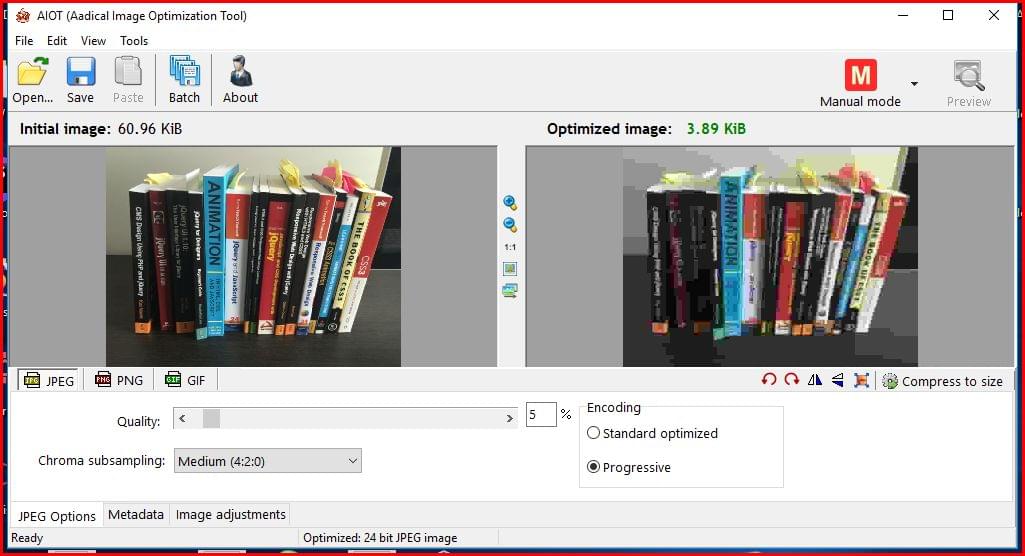
Aiot ( image optemizer)
Image Optimizer: Improve Website Speed and SEO Performance
Why an Image Optimizer Is Important
An Aiot image optimizer is one of the most essential tools for improving website performance, enhancing user experience, and increasing search engine visibility. Websites with uncompressed or poorly optimized images often load slowly, causing visitors to leave before the page fully appears. Search engines like Google prioritize fast-loading websites, making image optimization a crucial part of every SEO strategy.
Using an advanced image optimizer helps reduce image file size without affecting quality. Whether you manage a blog, eCommerce store, portfolio, or business website, optimized images can significantly improve page speed, mobile performance, and conversion rates.
According to Google PageSpeed Insights, image compression and next-generation image formats can dramatically improve Core Web Vitals and loading speed. You can learn more through this DoFollow resource from Google:
- Google PageSpeed Insights
Internal Resource:
- Website Speed Optimization Guide
Best Image Optimizer Features for Faster Websites
Choosing the right image optimizer requires understanding the key features that affect website performance. A professional optimization tool should include:
1. Automatic Compression
A reliable image optimizer automatically compresses uploaded images to reduce file size while preserving visual quality. Automatic compression saves time and ensures every image on your website remains optimized.
2. WebP and AVIF Support
Modern image formats like WebP and AVIF provide better compression compared to traditional PNG and JPEG formats. An advanced image optimizer should convert images into these next-generation formats for improved speed.
3. Bulk Optimization
Bulk image optimization allows users to compress hundreds of images at once. This feature is especially useful for large websites and eCommerce platforms with thousands of media files.
4. Lazy Loading Integration
Lazy loading delays image loading until users scroll to a specific section. Combining lazy loading with an efficient image optimizer improves page speed and reduces server load.
5. CDN Compatibility
Many modern optimization tools integrate with CDN services to deliver images faster across different regions.
External Resource:
- Web.dev Performance Optimization
Internal Resource:
- Technical SEO Services
How an Image Optimizer Improves SEO Rankings
An effective image optimizer contributes directly to search engine optimization. Search engines evaluate website speed, mobile responsiveness, and user engagement when ranking pages. Optimized images help improve all these factors.
Better Core Web Vitals
Google uses Core Web Vitals as ranking signals. Large images often increase Largest Contentful Paint (LCP), negatively affecting performance. A high-quality image optimizer reduces image size and improves loading metrics.
Improved Mobile Experience
Mobile users expect websites to load instantly. Optimized images consume less bandwidth and provide a faster browsing experience, especially on slower mobile networks.
Lower Bounce Rates
Visitors tend to leave slow websites quickly. Faster loading pages achieved through a professional image optimizer can increase engagement and reduce bounce rates.
Enhanced Crawl Efficiency
Search engine bots crawl optimized websites more efficiently because pages load faster and consume fewer resources.
You can explore Google’s official SEO recommendations here:
- Google SEO Starter Guide
Internal Resource:
- Core Web Vitals Guide
Image Optimizer Best Practices for Content Creators
Content creators, bloggers, and digital marketers should follow several best practices while using an image optimizer.
Add Focus Keyword as Alt Text
Adding the focus keyword in image alt text improves accessibility and image search visibility.
Example Alt Text: “image optimizer dashboard for website SEO performance”
Resize Images Before Uploading
Uploading oversized images increases loading time. Resize images according to your website layout before optimization.
Compress Every Uploaded Image
Even modern smartphones generate large image files. Running every image through an image optimizer ensures consistent website speed.
Monitor Website Performance Regularly
Use tools like GTmetrix and Google Lighthouse to evaluate image performance and identify optimization opportunities.
External Resource:
- GTmetrix Website Speed Tool
Internal Resource:
- Site Speed Checker
Why Every Website Needs an Image Optimizer
A modern website cannot compete effectively without a proper image optimizer. Faster websites provide better user experiences, achieve higher search rankings, and improve conversion rates. Whether you operate a personal blog or a large online store, optimized images reduce bandwidth usage, improve mobile responsiveness, and support long-term SEO growth.
Investing in a powerful image optimizer is one of the simplest and most effective ways to enhance website performance. With advanced compression, lazy loading, modern image formats, and SEO-friendly optimization features, image optimization has become a necessity rather than an option.
By implementing the right optimization strategy, website owners can improve loading speed, strengthen search visibility, and create a smoother browsing experience for visitors across all devices.