Advance Windows Browser for Image Viewing and Editing
AI Browser
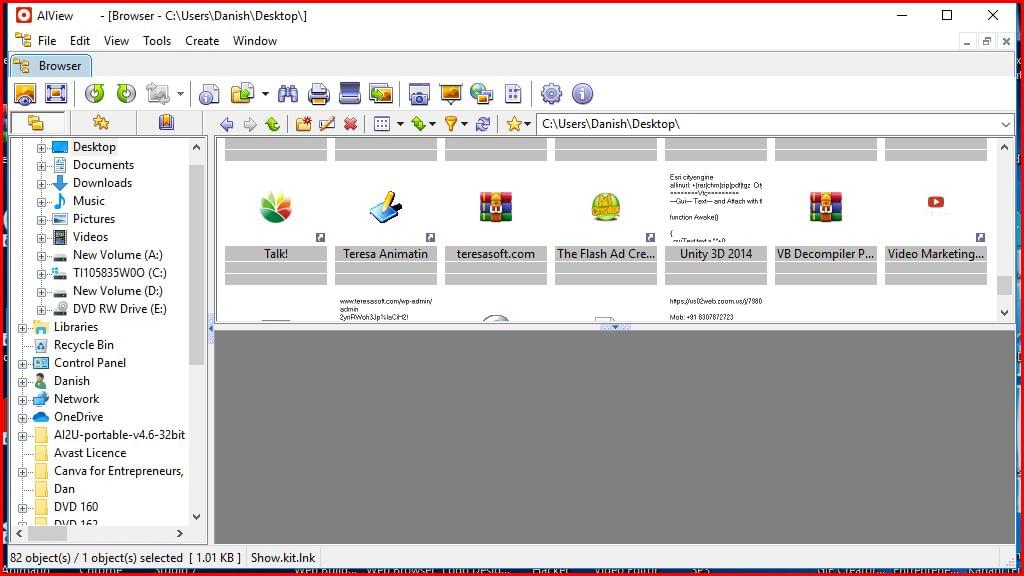
AIView MP is an advanced windows browser and image viewer designed for users who want a fast, reliable, and feature-rich platform to manage photos and digital images. Whether you are a professional photographer, graphic designer, or casual user, AIView MP provides powerful tools to open, organize, edit, and convert image files with ease. Its explorer-like interface ensures smooth navigation, while advanced editing and batch processing tools help improve productivity.
![windows browser alt=”windows browser”]
One of the strongest advantages of AIView MP is its support for multiple image formats. The software can easily open and manage popular file types including JPEG, PNG, GIF, TIFF, WEBP, PSD, JPEG2000, OpenEXR, HEIC, PDF, DNG, CR2, and camera RAW files. This broad compatibility makes it a preferred solution for photographers and content creators who work with different image sources daily.
Why Choose This Windows Browser for Images?
AIView MP is more than just an image viewer. It combines image management, editing, and conversion features into one powerful application. Users can quickly browse folders, preview images instantly, and make adjustments without switching between multiple software programs.
Some major benefits include:
- Fast image loading and preview
- Batch image processing
- Advanced photo editing tools
- Duplicate image finder
- Metadata editing support
- Contact sheet creation
- Slideshow maker
- Screen capture tools
The software is designed for speed and efficiency, helping users save valuable time when working with large image collections.
Powerful Editing Features in AIView MP
AIView MP includes a complete set of editing tools that allow users to improve image quality quickly. You can adjust brightness, contrast, color balance, and sharpness with just a few clicks. The built-in crop and resize options make it easy to prepare images for websites, social media, or printing.
Additional editing features include:
- Image resizing
- Cropping and rotating
- Color correction
- Watermark addition
- Text overlay
- Filter effects
- Screen capture functionality
These features make AIView MP a versatile choice for both beginners and advanced users.
Batch Conversion and Resizing Tools
The software also includes XnConvert and XnResize tools for batch image processing. These utilities help users convert and resize multiple files at the same time, significantly improving workflow efficiency.
With batch processing, users can:
- Convert images into different formats
- Apply watermarks automatically
- Add text overlays
- Resize hundreds of images instantly
- Enhance image quality in bulk
- Apply filters to multiple photos
This functionality is especially useful for photographers, bloggers, and eCommerce businesses that handle large numbers of product or gallery images.
Image Management and Organization
AIView MP offers advanced image management tools to keep your digital library organized. Users can rename files in batches, search for duplicate images, compare similar pictures, and manage metadata like IPTC and XMP information.
The software’s explorer-style interface ensures easy folder navigation and quick file access. This makes it ideal for users who need a reliable image management solution on Windows systems.
For more information about image metadata standards, visit Adobe XMP Metadata Guide.
You can also learn more about RAW image formats from Canon RAW Image Documentation.
Performance and User Experience
AIView MP is optimized for high performance on modern Windows devices. The lightweight design ensures smooth operation even when handling large RAW image files or high-resolution photos. Its clean and user-friendly layout allows beginners to start quickly while still offering advanced tools for professionals.
Users looking for additional image optimization techniques can explore Google Image Optimization Guide.
For related tutorials and software guides, check our internal resources:
Final Thoughts
AIView MP stands out as a professional image viewer and editing solution for Windows users. With extensive format support, powerful editing tools, batch processing capabilities, and advanced image management features, it delivers everything needed for efficient photo handling in one application.
If you need a dependable windows browser for viewing, editing, converting, and organizing images, AIView MP is an excellent choice for both personal and professional use.