
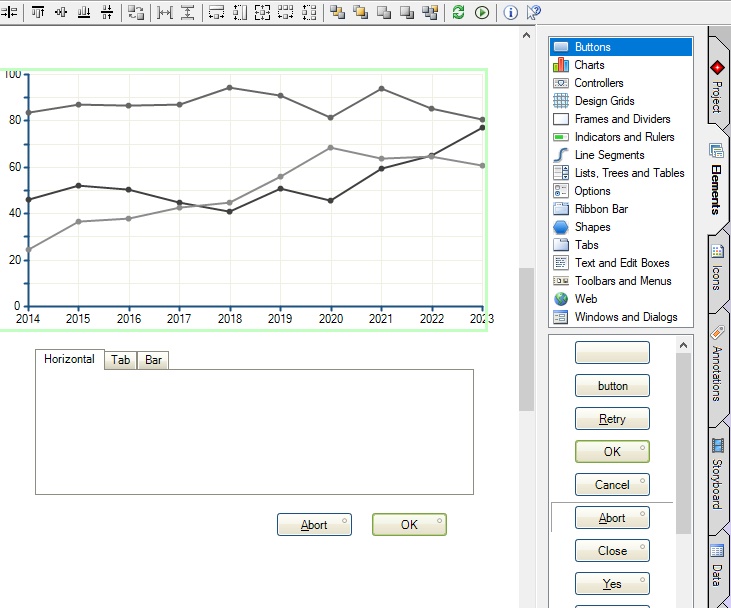
GUI Creator Studio – Professional GUI Design & Prototyping Software
Teresa GUI Creator Studio is a powerful GUI design software and advanced user interface prototyping tool created for professionals who want to design modern applications, websites, dashboards, and interactive user experiences with speed and precision. Whether you are a beginner, UI/UX designer, software architect, developer, or product manager, this no-code GUI builder simplifies the entire interface design process.
Unlike traditional development tools that require programming knowledge, Teresa GUI Creator Studio allows users to create visually rich interfaces directly on screen using an intuitive drag-and-drop interface builder. This makes it one of the best solutions for designing professional user interfaces without writing code.
Why Choose Teresa GUI Creator Studio for GUI Design?
Modern software development requires fast prototyping, smooth collaboration, and visually appealing interfaces. Teresa GUI Creator Studio helps teams quickly transform ideas into realistic UI mockups, interactive wireframes, and functional design prototypes.
With this GUI prototyping software, users can design:
- Desktop applications
- Web applications
- Mobile-inspired layouts
- Dialog windows
- Software dashboards
- Interactive forms
- UI components and controls
- Complete website mockups
The software is designed to improve productivity while keeping the focus on UI/UX design, usability, and customer experience.
Key Features of Teresa GUI Creator Studio
1. Powerful Drag-and-Drop GUI Builder
The built-in drag-and-drop interface builder makes designing interfaces extremely simple. Users can add buttons, menus, forms, icons, and visual components without coding knowledge.
2. Professional UI/UX Design Tools
Create modern layouts and high-quality user experiences using professional UI/UX design software tools. This feature is ideal for startups, agencies, and enterprise development teams.
3. Interactive Prototype Creation
Build realistic and interactive prototypes that simulate actual software behavior. This helps teams validate concepts before development begins.
4. Advanced Wireframing & Mockup Design
Design professional wireframes and UI mockups for software planning, presentations, and stakeholder approvals.
5. No-Code GUI Development
This no-code GUI design platform enables non-programmers to create software interface concepts visually without technical barriers.
6. Cross-Platform Design Workflow
The software supports projects for both Windows applications and web interface design, allowing flexibility across multiple development environments.
7. Developer-Friendly Workflow
Design interfaces first and later export specifications for development teams. This improves communication between designers and developers.
Benefits of Using Teresa GUI Creator Studio
Using Teresa GUI Creator Studio can significantly improve the efficiency of your software planning and interface design workflow.
Main Benefits:
- Faster GUI design process
- Reduced development planning time
- Improved collaboration between teams
- Better visual communication
- Easy interface experimentation
- Professional software presentations
- Enhanced user experience planning
- Simplified UI documentation
The software is suitable for businesses of all sizes, including freelancers, software companies, startups, educational institutions, and enterprise teams.
Common Use Cases for Teresa GUI Creator Studio
Application Interface Design
Create complete application interfaces with menus, dialogs, forms, and custom layouts.
Website UI Prototyping
Design responsive web page mockups and modern user experiences for websites and portals.
Software Requirement Documentation
Use screenshots and annotated UI designs to explain software workflows and functionality.
Product Presentations & Storyboards
Create visually impressive presentations and concept demonstrations for clients and stakeholders.
UX Improvement Planning
Identify usability problems and suggest UI/UX improvements through visual documentation.
Developer Specifications
Generate professional interface layouts that developers can easily understand and implement.
Teresa GUI Creator Studio for Modern Development Teams
Today’s software teams require fast and efficient design tools that reduce complexity while improving productivity. Teresa GUI Creator Studio provides a streamlined workflow that allows designers and developers to focus on creativity, functionality, and user experience.
Because the software works independently of programming languages or frameworks, teams can freely choose their preferred development environment after completing the design process. This flexibility makes Teresa GUI Creator Studio one of the most practical GUI design and prototyping solutions available today.
Conclusion
If you are searching for a reliable, feature-rich, and easy-to-use GUI design software, Teresa GUI Creator Studio is an excellent choice. Its professional interface design capabilities, no-code workflow, interactive prototyping features, and powerful mockup tools make it ideal for modern UI/UX projects.
From wireframes and storyboards to full application layouts and website prototypes, Teresa GUI Creator Studio helps transform ideas into professional visual experiences quickly and efficiently.
Suggested SEO Meta Title
7 Powerful Teresa GUI Creator Studio Features for UI/UX Design
Suggested SEO Meta Description
Discover Teresa GUI Creator Studio, a powerful GUI design software with drag-and-drop tools, interactive prototyping, UI/UX design features, and no-code interface creation for professional applications and websites.
Suggested Focus Keyword
Teresa GUI Creator Studio
Internal Link Suggestions
- UI/UX Design Tools
- Best Wireframing Software
- Website Prototyping Solutions
- Software Development Tools


