
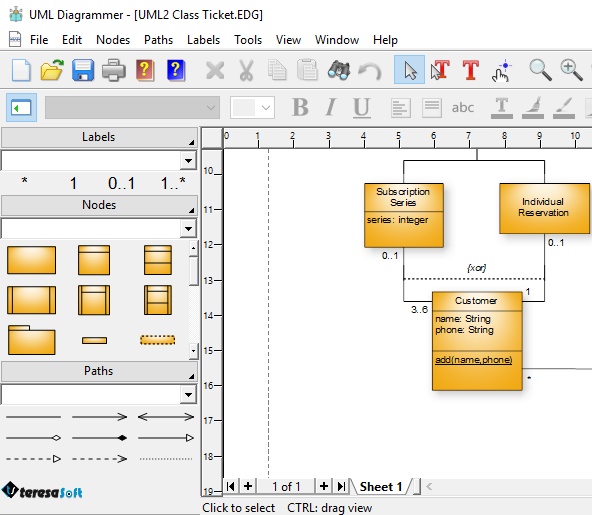
UML Diagrammer – Advanced Unified Modeling Language Design Tool
The UML Diagrammer is a powerful and intuitive UML modeling platform created for software developers, system architects, engineers, and IT professionals who need professional tools for visual software design. This advanced UML solution enables users to create, edit, organize, and manage diagrams with precision and efficiency. Whether you are designing enterprise applications, documenting workflows, or planning system architecture, the software provides everything required to streamline modern development processes using industry-standard methodologies.
Inside this comprehensive help system, users will discover practical techniques and proven strategies for building high-quality diagrams, including class diagrams, sequence diagrams, activity diagrams, component diagrams, and use case diagrams. The software simplifies complex modeling tasks while maintaining the flexibility required by professional teams. From small software projects to large-scale enterprise systems, the platform supports scalable and accurate documentation for every stage of development.
This guide assumes a basic understanding of core software concepts, diagramming tools, and standard modeling terminology. However, beginners can quickly learn the fundamentals of through the integrated tutorials, user documentation, and guided examples available throughout the platform. Advanced users will also benefit from the software’s extensive customization options, automation features, and productivity-focused interface designed specifically for efficient workflow management.
Built according to the official UML 2.5.1 specification established by the Object Management Group (OMG), the software ensures full compatibility with modern industry practices and software engineering standards. By following recognized conventions, teams can improve collaboration, communication, and technical consistency across projects. The platform also integrates recommendations from trusted software engineering resources, making it a dependable environment for accurate modeling and technical documentation.
The software includes a rich collection of templates, symbols, connectors, and design assets that simplify the creation of professional diagrams. Users can quickly customize visual elements, organize model structures, and create reusable templates for software architecture, database systems, cloud applications, and business process analysis. These intelligent tools reduce manual effort while improving the overall quality and readability of every project.
To maintain clarity and consistency, the Symbols and Conventions section provides detailed references to industry publications and accepted standards. This organized approach helps ensure that all diagrams remain easy to interpret across teams, departments, and development environments. The platform is especially valuable for organizations that require standardized technical documentation and collaborative system planning.
In situations where different modeling standards or documentation sources conflict, the software intelligently balances usability, professional standards, and practical design workflows. Instead of forcing rigid formatting rules, the platform gives users the flexibility to adapt diagrams according to project requirements and organizational preferences. This flexible approach makes the tool suitable for agile development, enterprise planning, and educational environments alike.
Because software development methodologies continue to evolve, the guide is designed as a dynamic and adaptable learning resource rather than a fixed authority. As modern technologies introduce new architectural patterns and modeling approaches, the platform ensures users can continue building accurate and efficient documentation without disruption. The software’s flexible framework allows teams to remain aligned with current design trends while preserving compatibility with established standards.
The advanced interface combines usability with professional-grade functionality, allowing users to navigate large projects with ease. Drag-and-drop editing, intelligent alignment tools, diagram validation, and automatic layout optimization help accelerate the creation of professional models. These features improve productivity while reducing the complexity often associated with technical diagramming software.
Perfect for software developers, business analysts, educators, students, and enterprise teams, the UML Diagrammer provides a complete environment for creating professional diagrams and improving software design workflows. Whether you are documenting application architecture, planning databases, or analyzing business systems, this advanced UML platform delivers the flexibility, reliability, and performance needed for modern technical modeling.
Key Features:
- Advanced UML Diagram Creation Tools
- Customizable Templates and Symbols
- Professional Software Architecture Design
- Easy-to-Use Interface for Developers & Engineers
- Flexible and Scalable Diagramming Capabilities
Perfect for software developers, IT professionals, system analysts, and students, the UML Diagrammer is your go-to solution for creating high-quality project diagrams and improving software design workflows.


