File Backup – Secure and Reliable Data Protection Solution
-
What is File Backup?
File Backup refers to the process of creating copies of files and storing them in a separate location from the original files. The main purpose of File Backup is to ensure that important data remains accessible and recoverable in the event of accidental deletion, hardware failure, cyberattacks, malware infections, theft, or unexpected disasters.
In today’s digital environment, businesses and individuals rely heavily on data for daily operations. Losing critical documents, customer databases, project files, financial records, or media assets can result in severe financial and operational damage. A professional File Backup solution helps eliminate these risks by ensuring your data is securely copied and easily restored whenever needed.
Why File Backup is Essential for Every Business
Modern organizations generate massive amounts of data every day. Without a proper File Backup system, recovering lost information becomes extremely difficult and expensive. Whether you are running a small business or managing enterprise-level operations, secure backup solutions are necessary for business continuity.
Benefits of Using a File Backup Solution
- Protects files from accidental deletion
- Prevents permanent data loss during hardware failure
- Safeguards important information from ransomware attacks
- Enables quick disaster recovery
- Maintains business continuity and productivity
- Supports secure long-term data storage
- Simplifies data restoration processes
A reliable File Backup system ensures that your important files are always available when you need them most.
Powerful Features of File Backup
1. Automatic Backup Scheduling
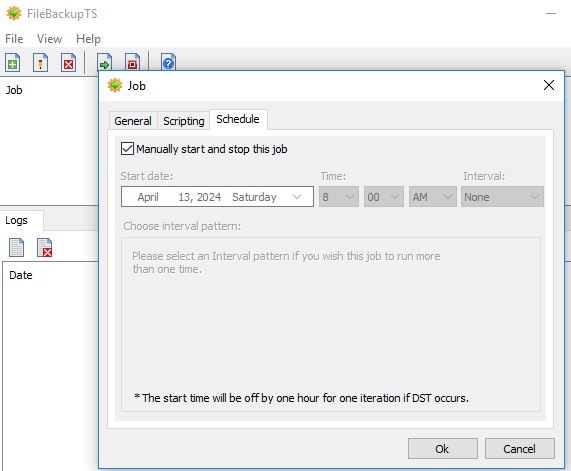
One of the most useful features of a professional Backup solution is automated scheduling. Users can configure daily, weekly, or monthly backup routines without manual intervention. This automation reduces human error and guarantees continuous protection of critical data.
Automatic scheduling also ensures that newly created or modified files are regularly backed up, minimizing the risk of losing recent work.
2. Secure Data Encryption
Security is a major concern when handling sensitive information. Advanced Backup systems use powerful encryption technologies to protect files during storage and transfer.
Encrypted backups prevent unauthorized access and ensure confidential data remains protected against cyber threats, hackers, and data breaches.
3. Incremental Backup Technology
Incremental backup saves only the files that have changed since the previous backup. This feature significantly reduces storage space usage and improves backup speed.
Instead of copying all files repeatedly, incremental Backup efficiently updates modified data, making the process faster and more resource-friendly.
4. Fast File Recovery
The primary purpose of any File Backup system is fast recovery. In case of data corruption or accidental deletion, users can quickly restore lost files without lengthy downtime.
Quick restoration capabilities help businesses continue operations smoothly and reduce productivity losses caused by unexpected data issues.
5. Multi-Device Compatibility
Modern File Backup software supports multiple devices including desktops, laptops, external drives, and servers. This flexibility enables organizations to protect data across various systems from a centralized platform.
Multi-device compatibility simplifies backup management and improves operational efficiency.
6. Real-Time Backup Monitoring
Real-time monitoring helps users track backup status, storage usage, and system performance. Notifications and alerts ensure administrators are informed about backup completion, failures, or security concerns.
This feature improves reliability and helps maintain uninterrupted File Backup protection.
How File Backup Protects Against Data Loss
Data loss can occur unexpectedly due to several reasons including:
- Hard drive crashes
- Virus and malware attacks
- Human error
- Accidental deletion
- Power failures
- Natural disasters
- System corruption
A strong File Backup strategy ensures that duplicate copies of important files remain available even if the original data becomes damaged or inaccessible.
Businesses that implement reliable backup systems recover faster from disasters and avoid costly operational interruptions.
Best Practices for Effective File Backup
To maximize data protection, organizations should follow these best practices:
Use Multiple Backup Locations
Store backups in both local and cloud environments for additional protection.
Schedule Regular Backups
Frequent backups reduce the amount of data lost during unexpected failures.
Test Backup Recovery
Regularly verify that backup files can be restored successfully.
Encrypt Sensitive Files
Protect confidential information using advanced encryption methods.
Monitor Backup Performance
Track backup activities to identify issues before they become major problems.
Following these strategies improves the reliability and effectiveness of your File Backup system.
Why Choose TeresaSoft File Backup Solution?
The TeresaSoft File Backup Solution offers advanced data protection features designed for businesses and individual users. It provides secure storage, automated backup scheduling, fast recovery options, and reliable cloud integration to ensure complete protection of critical files.
With user-friendly functionality and powerful security capabilities, TeresaSoft helps organizations maintain safe, accessible, and recoverable data at all times.
Conclusion
Implementing a reliable Backup solution is one of the most important steps in protecting valuable digital information. From preventing accidental data loss to defending against ransomware and hardware failures, effective backup systems ensure business continuity and long-term security.
A professional Backup platform provides automation, encryption, cloud storage, rapid recovery, and real-time monitoring to keep your files safe and accessible. Investing in a dependable backup solution today can save businesses from costly disruptions and irreversible data loss in the future.